About Wattpad
What is Wattpad?
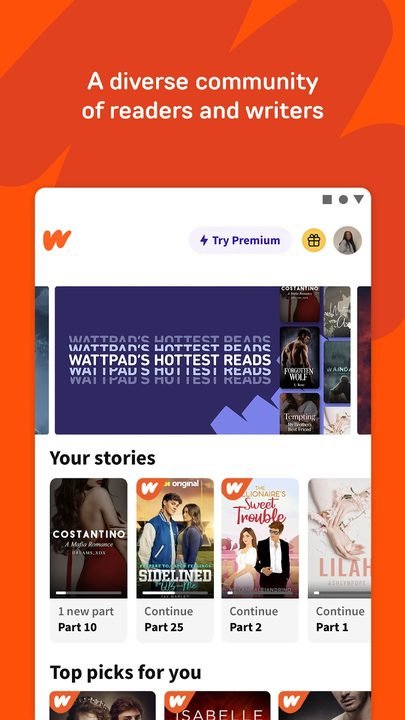
Wattpad is a social reading and writing platform developed by Wattpad.com, where a huge community publishes and shares original stories. It works like a cross between a social network and a digital library: anyone can read novels, short stories and fanfiction for free, and also become an author by publishing their own texts chapter by chapter.
Its popularity comes from that closeness between readers and writers. Works are updated little by little, readers comment on every part, and many authors build loyal communities around their stories. Genres like romance, teen fiction, horror and fanfiction have a huge presence, and some works born in the app have made the leap to printed books and screen adaptations.
Key features of Wattpad 2026
These are the main functions Wattpad offers for both reading and writing.
🔧 Reading
- Free access to millions of stories by chapter.
- Offline mode to download and read without internet.
- Customizable reader with fonts, sizes and dark theme.
✨ Community and writing
- Publish your own works and build an author profile.
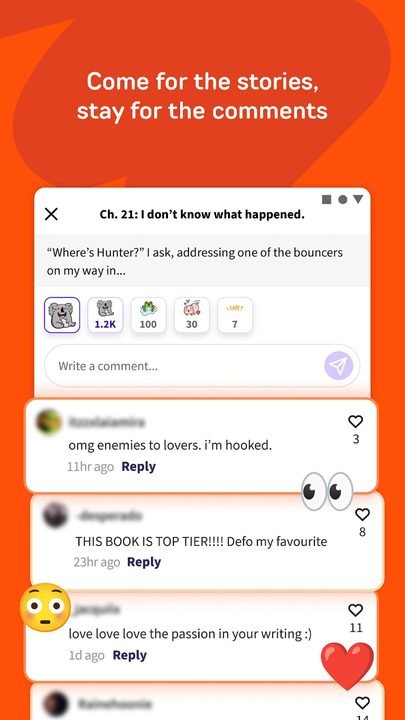
- Paragraph-by-paragraph comments to interact with other readers.
- Reading lists, tags and personalized recommendations.
🔐 Account and extras
- Personal library synced across devices.
- Coins to unlock chapters of premium stories.
- Optional Premium subscription with no ads.
How to download and install Wattpad on Android
- Tap the official download button on this page, which takes you to Google Play.
- On the Wattpad listing, tap “Install” and wait for it to finish.
- Open the app from its orange icon on your home screen.
- Create a free account or sign in with your email or social networks.
- Choose your favorite genres to get tailored recommendations.
- Add stories to your library and start reading or publishing your own.
System requirements
- System: Android 8.0 or higher.
- Storage: around 40 MB for the app, plus space for downloaded chapters.
- Connection: internet to discover and sync; you can read downloaded content offline.
- Account: a free Wattpad account to save your library and comment.
Pros and cons of Wattpad
✓ Advantages
- Millions of free stories in many languages.
- A very active community of readers and authors.
- Simple tools to publish your own texts.
- Offline reading and a customizable reader.
- Perfect for discovering new talent and genres.
✕ Disadvantages
- There are ads unless you pay for Premium.
- Some premium stories are unlocked with coins.
- Content quality is very uneven.
- Many works are left unfinished by their authors.
Wattpad versus its alternatives
Wattpad competes with apps like Inkitt, Webnovel and Radish. Its big advantage is the size of its community and how easy it is to publish for free. Webnovel leans more toward Asian novels and a pay-per-chapter model; Inkitt stands out for discovering authors with publishing potential; and Radish focuses on serialized fiction with a more commercial approach.
| App | Strength | Platform |
|---|---|---|
| Wattpad | Huge, free community | Android |
| Webnovel | Translated Asian novels | Android / iOS |
| Inkitt | Author discovery | Android / iOS |
Common Wattpad problems and solutions
I can't read a chapter offline
You need to download it first. Open the story while online, go into its menu and tap the option to download or save offline so you can access it later.
The app shows too many ads
The free version includes advertising. You can reduce or remove it with the Premium subscription, or close and reopen the app so it loads fewer ads between chapters.
My published story doesn't appear
Check that you marked it as public and not as a draft. New stories take a little while to be indexed; also make sure each chapter is published and not saved as a draft.
I lost my library when I changed phones
Your library syncs with your account. Sign in with the same email or social network you used before and your saved stories will reappear.
What's new in Wattpad in 2026
Version 10.40.0 from June 2026 improves the offline reader, adds new customization options and fixes bugs when publishing chapters. Over the course of the year the discovery screen has been redesigned with more accurate recommendations, the in-app tools for authors have been expanded, and comments and reader accessibility have been improved.
Frequently asked questions about Wattpad
Is Wattpad free?
Yes, reading and publishing are free. Some premium stories are unlocked with coins, and there is an optional Premium subscription that removes the ads.
Is it safe to download Wattpad?
Yes, as long as you do it from the official Google Play, as this page links to. It's the platform's verified app.
Does Wattpad work on iPhone?
Yes, it has an iOS version and can also be used from a browser on its website, all with the same account.
Do I need an account to use Wattpad?
You can read some content without an account, but to save your library, comment or publish you need to sign up for free.
Does Wattpad use a lot of data or battery?
Since it's text reading, usage is low. Downloading chapters over Wi-Fi lets you read later without spending mobile data.
How do I update Wattpad?
Open Google Play, search for Wattpad and tap “Update”. With automatic updates enabled it stays current effortlessly.
Conclusion: is Wattpad worth it in 2026?
In 2026 Wattpad remains the go-to option for anyone who enjoys reading and writing stories. Its giant community, free access and ease of publishing make it unique, even if content quality varies and there are ads. If you like romance, fanfiction or discovering up-and-coming authors, it's an essential app that blends reading and social networking like no other.
Features
Screenshots



How to Download & Install Wattpad
Click the download button above to get the latest APK file.
Go to Settings > Security > Enable "Install from Unknown Sources" or allow your browser to install apps.
Open your file manager and navigate to the Downloads folder to find the APK file.
Tap the APK file and follow the on-screen instructions to complete the installation.
Launch Wattpad from your app drawer and enjoy all its features!
Ready to Download?
Wattpad v11.40.5 · 40 MB · Safe & Verified
What's New v11.40.5
v11.40.5 (30 de septiembre de 2026): correcciones de errores y mejoras de rendimiento.
v10.40.0 (Junio 2026): Mejoras en el lector sin conexión, nuevas opciones de personalización y corrección de fallos al publicar capítulos.
v10.36 (Abril 2026): Rediseño de la pantalla de descubrimiento con recomendaciones más precisas y mejoras de rendimiento.
v10.30 (Febrero 2026): Nuevas herramientas para autores en la app y soporte ampliado para borradores sincronizados.
v10.24 (Diciembre 2025): Mejoras en los comentarios, ajustes de accesibilidad del lector y correcciones de estabilidad.
Frequently Asked Questions
Is Wattpad safe?
The button takes you to the official Google Play listing, which scans apps with Google Play Protect. Modilimitado does not host the file. Avoid modified APKs from other sites.
Is Wattpad free?
Yes, Wattpad is free. The button takes you to the official Google Play listing. Modilimitado does not host the file.
Will it work on my device?
Requirement listed on this page: Android 8.0+. Check the store or the official website to see if your model is supported.
Do I need to create an account?
No, you don't need to sign up to download Wattpad.
How do I update to the latest version?
Come back to this page to get the latest version. We update Wattpad regularly.