Google Gemini v1.2026.24
About Google Gemini
What is Google Gemini?
Google Gemini is Google LLC's official artificial intelligence assistant for Android, the successor to the app formerly known as Bard. It works as a conversational assistant you can talk to by text or by voice to answer questions, draft text, summarize information, create images, analyze documents and photos, or get help with everyday and professional tasks.
What makes it especially useful is how it integrates with the Google ecosystem: through extensions it can pull from Gmail, Maps, YouTube and other services, and on many phones it can be set as the main assistant to respond and carry out actions proactively. Backed by Google's latest AI models, it delivers up-to-date answers and handles language so naturally that it has become one of the most widely used AI apps.
Key features of Google Gemini 2026
These are the capabilities that define Google Gemini as an AI assistant:
🔧 Conversation and ideas
- Text and voice chat in natural language.
- Generation of text, summaries, ideas and translations.
- Help with programming and code explanation.
- Access to up-to-date information from the web.
✨ Creativity and analysis
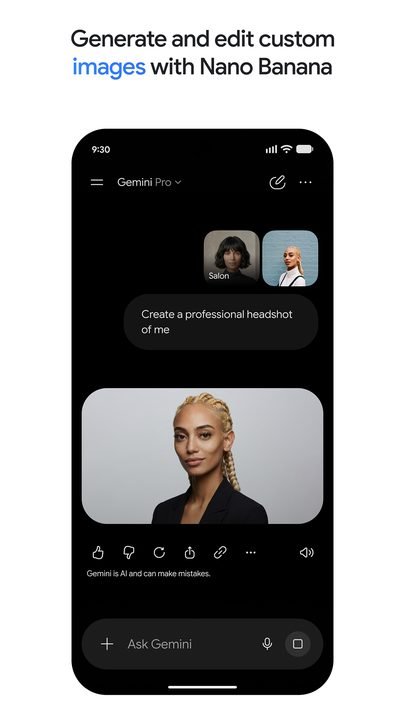
- Image creation and editing powered by AI.
- Analysis of photos, documents and PDF files.
- Live voice mode for smooth, flowing conversations.
🔐 Integration and ecosystem
- Extensions with Gmail, Maps, YouTube and more Google apps.
- Main assistant mode for actions on your phone.
- History sync across mobile, web and other devices.
How to download and install Google Gemini on Android
- Tap the official download button on this page, which opens the Google Gemini listing on Google Play.
- Tap Install and wait for the download to finish.
- Open the app from its icon on your home screen.
- Sign in with your Google account to personalize the assistant.
- Grant the permissions you want to use, such as the microphone for voice or the camera for analyzing images.
- Start typing or speaking your questions; optionally turn on the Google extensions you're interested in.
System requirements
- System: Android 10+
- Storage: around 75 MB for the app, plus space for the cache and the files you analyze.
- Connection: an internet connection is essential, since AI processing takes place in the cloud.
- Account: a Google account is required to sign in and use the assistant.
Pros and cons of Google Gemini
✓ Advantages
- Powerful AI assistant that's free in its base version.
- Very natural handling of text and voice.
- Deep integration with the Google ecosystem.
- Able to analyze images, documents and code.
- Answers backed by recent information from the web.
✕ Disadvantages
- Requires a permanent internet connection.
- The most advanced features require a paid subscription.
- Demands a Google account and sharing certain data.
- AI answers may contain errors and are worth verifying.
Google Gemini versus its alternatives
Compared with ChatGPT, Gemini stands out for its native integration with Google services and its role as the phone's assistant, while ChatGPT boasts a very mature ecosystem of features and add-ons. Compared with Microsoft Copilot, Gemini leans on Google and Android, whereas Copilot integrates better with Windows and Microsoft tools.
| App | Strength | Platform |
|---|---|---|
| Google Gemini | Integration with Google and phone assistant | Android / iOS |
| ChatGPT | Mature ecosystem of features | Android / iOS |
| Microsoft Copilot | Integration with Windows and Microsoft 365 | Android / iOS |
Common Google Gemini problems and solutions
The assistant doesn't respond or throws an error
This is usually down to the connection. Check your internet, close and reopen the app, and make sure it's updated to the latest version.
Some features show up as paid
The most advanced capabilities belong to the premium plan. You can use the free assistant or subscribe to unlock the higher-tier models and features.
Voice recognition isn't working
Make sure you've granted the microphone permission in the system settings and that no other app is using the microphone at the same time.
My Google extensions don't appear
Make sure you've signed in with the right account and that the extensions are enabled in the settings; some depend on your region or language.
What's new in Google Gemini in 2026
Version 1.2026.24 from June 2026 introduces new, faster reasoning models and improves the analysis of images and documents. Over the year, the live voice mode was strengthened for smoother conversations, the extensions were expanded with more Google apps, image generation was overhauled, and answer accuracy was improved by drawing on recent information from the web.
Frequently asked questions about Google Gemini
Is Google Gemini free?
Yes, the app is free and offers plenty of features at no cost, although there is a paid plan that unlocks advanced models and capabilities.
Is it safe to download Google Gemini?
Yes, as long as you download it from the official Google Play, as this page links to, since it's Google's original app. Avoid third-party copies.
Does Google Gemini work on iPhone?
Yes, there's an iOS version available on the App Store in addition to the Android one.
Do I need an account to use Google Gemini?
Yes, a Google account is required to sign in and make the most of the assistant and its integrations.
Does Google Gemini use a lot of data or battery?
Since it's processed in the cloud, it uses data with every query, especially with voice and images; battery consumption is moderate under normal use.
How do I update Google Gemini?
From Google Play, tap Update on the app's listing or turn on automatic updates.
Conclusion: is Google Gemini worth it in 2026?
As an artificial intelligence assistant built into Android, Google Gemini is in 2026 one of the most complete and practical options, especially if you use Google's services every day. The free version covers most needs, and the paid plan makes sense for anyone who wants to squeeze the most out of the most powerful models for work or study.
Features
Screenshots
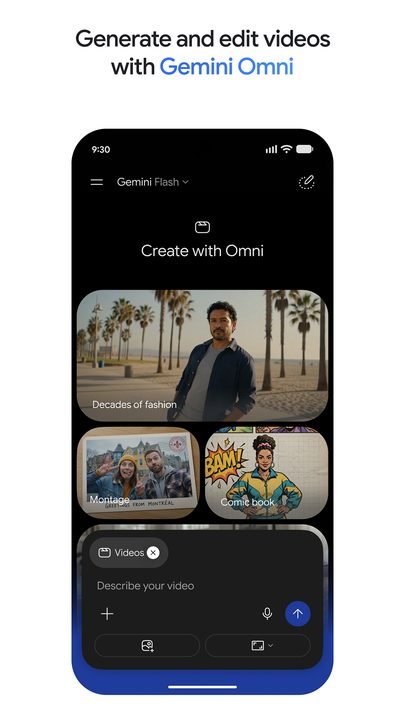
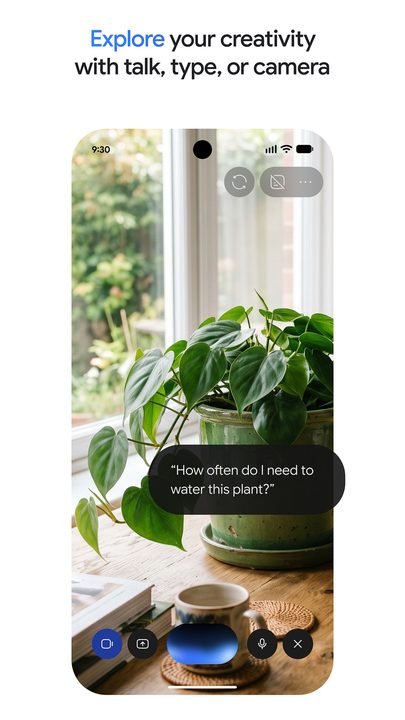
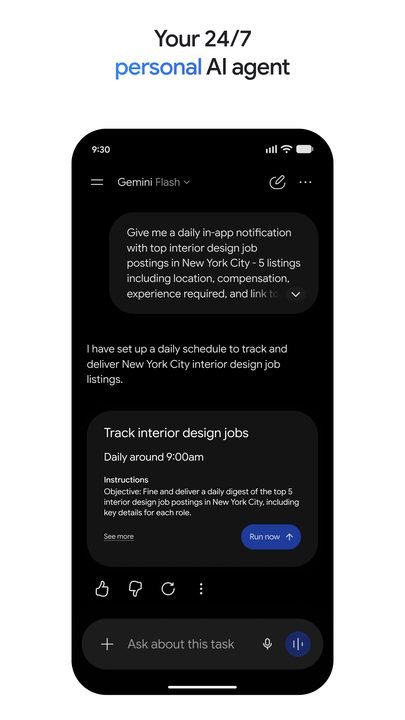
How to Download & Install Google Gemini
Click the download button above to get the latest APK file.
Go to Settings > Security > Enable "Install from Unknown Sources" or allow your browser to install apps.
Open your file manager and navigate to the Downloads folder to find the APK file.
Tap the APK file and follow the on-screen instructions to complete the installation.
Launch Google Gemini from your app drawer and enjoy all its features!
Ready to Download?
Google Gemini v1.2026.24 · 75 MB · Safe & Verified
What's New v1.2026.24
v1.2026.24 (Junio 2026): nuevos modelos de razonamiento más rápidos y mejoras en el análisis de imágenes y documentos.
v1.2026.18 (Abril 2026): modo de voz en directo mejorado y más extensiones con apps de Google.
v1.2026.10 (Febrero 2026): generación de imágenes renovada y respuestas más precisas con información reciente.
v1.2025.50 (Diciembre 2025): rediseño de la interfaz de conversación y mejoras de estabilidad.
Frequently Asked Questions
Is Google Gemini safe?
The button takes you to the official Google Play listing, which scans apps with Google Play Protect. Modilimitado does not host the file. Avoid modified APKs from other sites.
Is Google Gemini free?
It is free to download, but it has paid features, subscriptions or in-app purchases. The button takes you to the official Google Play listing. Modilimitado does not host the file.
Will it work on my device?
Requirement listed on this page: Android 10+. Check the store or the official website to see if your model is supported.
Do I need to create an account?
No, you don't need to sign up to download Google Gemini.
How do I update to the latest version?
Come back to this page to get the latest version. We update Google Gemini regularly.