About Alight Motion
What is Alight Motion?
Alight Motion is a video editing, animation and motion graphics app developed by Alight Creative, Inc. for Android devices. Unlike a conventional clip editor, it's built to work with layers, keyframes and animation curves, bringing a workflow similar to desktop programs like After Effects to your phone, but with a touch interface that's far more lightweight.
Its popularity grew enormously among content creators on TikTok, Instagram and YouTube who produce edits, animated intros, lyric videos and motion designs. Because it combines vector graphics, visual effects and audio syncing all in one place, it has become one of the most widely used mobile animation tools in the world, with hundreds of tutorials and communities dedicated to its projects.
Key features of Alight Motion 2026
These are the features that make Alight Motion a serious option for professional animation straight from your phone:
🔧 Editing and animation
- Unlimited layer system with both vector and bitmap graphics.
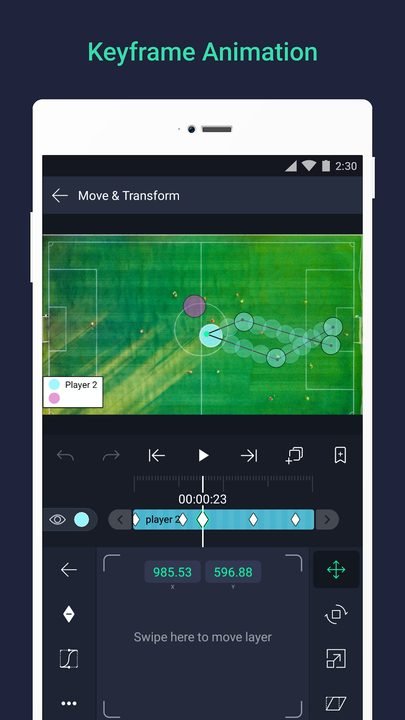
- Keyframe-based animation with full control over timing.
- Bézier curve editor to fine-tune the speed and smoothness of motion.
- Groups and pre-compositions to organize complex projects.
✨ Effects and visual style
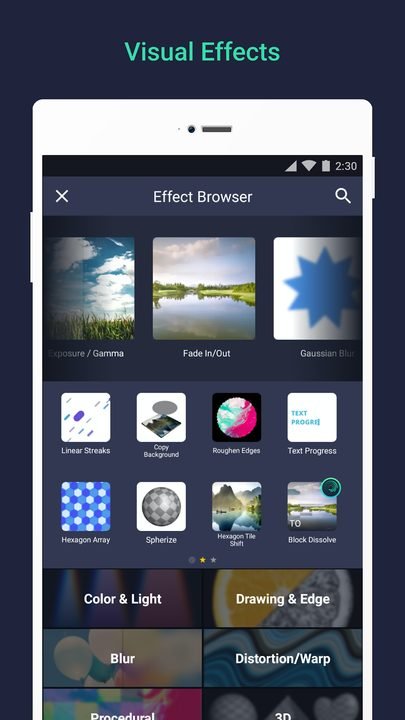
- More than 150 effects and filter combinations that can be applied per layer.
- Blend modes, masks and blurs for advanced compositions.
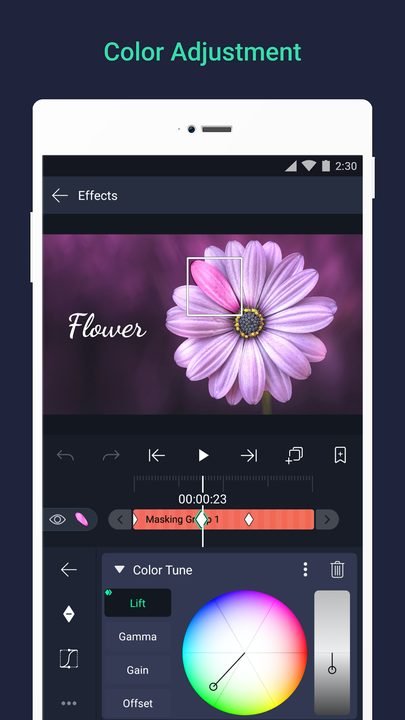
- Color correction and grading to give your work a professional finish.
🔐 Export and compatibility
- Export to MP4, animated GIF and PNG sequences.
- Resolutions up to 4K and 60 fps performance on powerful devices.
- Import your own fonts, audio and external assets.
How to download and install Alight Motion on Android
- Tap the official download button on this page, which takes you to the Alight Motion listing on Google Play.
- Tap Install and wait for the package download to finish.
- Open the app from the icon that appears on your home screen.
- Accept the basic storage permissions so you can save and export projects.
- Create your first project by choosing a resolution, aspect ratio and duration.
- Start adding layers and, if you like, subscribe to the paid version to remove the watermark.
System requirements
- System: Android 8.0+
- Storage: around 120 MB for the app, plus extra space for your projects and exports.
- Connection: required to download the app and online assets; editing works offline.
- Account: optional; an account is recommended to sync your subscription across devices.
Pros and cons of Alight Motion
✓ Advantages
- Very powerful keyframe animation for a mobile app.
- Vector graphics support that keeps everything sharp when scaling.
- A large community and plenty of tutorials and presets.
- High-quality export ready for social media.
- A reasonable learning curve compared with desktop software.
✕ Disadvantages
- The free version adds a watermark to some projects.
- Premium features require a paid subscription.
- It can drain quite a bit of battery and memory on long projects.
- The interface feels dense for absolute beginners.
Alight Motion versus its alternatives
Compared with KineMaster, Alight Motion stands out for keyframe animation and motion graphics, while KineMaster is more comfortable for traditional multi-layer video editing. Compared with CapCut, Alight Motion offers much finer control over animations, though CapCut wins on ease of use and quick templates for trends.
| App | Strength | Platform |
|---|---|---|
| Alight Motion | Keyframe animation and motion graphics | Android |
| KineMaster | Intuitive multi-layer video editing | Android / iOS |
| CapCut | Quick templates and ease of use | Android / iOS |
Common Alight Motion problems and solutions
The app crashes when exporting in 4K
Temporarily lower the resolution or the number of active layers, close other apps to free up memory, and update to the latest version, which improves stability on heavy exports.
A watermark appears on the final video
The watermark is removed with the paid subscription. Check that your account has an active subscription and export the project again.
The preview is slow or choppy
This is normal in projects with many layers and effects. The final export usually looks smooth even when the preview isn't; you can also hide heavy layers while you edit.
I can't find the fonts I imported
Make sure you've granted storage permission and placed the fonts in the correct folder; restart the app so the assets reload.
What's new in Alight Motion in 2026
Version 5.0.290 from June 2026 significantly improves real-time preview performance, adds new transition presets and fixes the bugs that caused crashes when exporting in 4K. Over the course of the year, the curve editor has been redesigned for smoother motion, the custom font options were expanded and new blend modes were added, along with optimized memory usage on long projects.
Frequently asked questions about Alight Motion
Is Alight Motion free?
Yes, it's free to download and you can animate and export, although the free version adds a watermark and premium features require a subscription.
Is it safe to download Alight Motion?
Yes, as long as you do it from the official Google Play, as this page links to. Avoid modified APKs from unofficial sites.
Does Alight Motion work on iPhone?
Yes, there's an iOS version available on the App Store, in addition to the Android version.
Do I need an account to use Alight Motion?
It's not required to edit, but it's worth signing in to sync your subscription and purchases across devices.
Does Alight Motion use a lot of data or battery?
Data usage is low once you've downloaded the app; however, long exports and heavy projects can put a real strain on the battery.
How do I update Alight Motion?
From Google Play, in the app management section, tap Update or turn on automatic updates.
Conclusion: is Alight Motion worth it in 2026?
If you make edits, animated intros or motion graphics, Alight Motion remains in 2026 one of the most complete tools you can have on your phone. The free version is enough to learn with, and the subscription is worth it for anyone who produces content regularly and wants to export without a watermark.
Features
Screenshots


How to Download & Install Alight Motion
Click the download button above to get the latest APK file.
Go to Settings > Security > Enable "Install from Unknown Sources" or allow your browser to install apps.
Open your file manager and navigate to the Downloads folder to find the APK file.
Tap the APK file and follow the on-screen instructions to complete the installation.
Launch Alight Motion from your app drawer and enjoy all its features!
Ready to Download?
Alight Motion v5.0.290 · 120 MB · Safe & Verified
What's New v5.0.290
v5.0.290 (Junio 2026): mejoras de rendimiento en la previsualización, nuevos presets de transición y corrección de fallos al exportar en 4K.
v4.9.5 (Abril 2026): editor de curvas rediseñado y soporte ampliado para fuentes personalizadas.
v4.8.0 (Febrero 2026): nuevos modos de fusión y optimización del consumo de memoria en proyectos largos.
v4.7.2 (Diciembre 2025): mejoras de estabilidad y compatibilidad con Android 15.
Frequently Asked Questions
Is Alight Motion safe?
The button takes you to the official Google Play listing, which scans apps with Google Play Protect. Modilimitado does not host the file. Avoid modified APKs from other sites.
Is Alight Motion free?
It is free to download, but it has paid features, subscriptions or in-app purchases. The button takes you to the official Google Play listing. Modilimitado does not host the file.
Will it work on my device?
Requirement listed on this page: Android 8.0+. Check the store or the official website to see if your model is supported.
Do I need to create an account?
No, you don't need to sign up to download Alight Motion.
How do I update to the latest version?
Come back to this page to get the latest version. We update Alight Motion regularly.