Video: How to download Pinterest
About Pinterest
What is Pinterest?
Pinterest is a visual discovery platform where millions of people search for, save and organize ideas for almost any project in their daily lives. Developed by Pinterest Inc., the app works like a giant inspiration board: instead of only showing posts from your contacts, it serves up images and videos —called pins— related to your interests, from cooking recipes and workout routines to decor ideas, fashion, travel or crafts.
The big difference compared to other social networks is its practical focus. Here, most people don't come to chat, but to plan: putting together a wedding, redecorating the living room, choosing a haircut or finding the perfect outfit for a special occasion. Every idea you like gets saved to personal boards that you can arrange by topic, which turns Pinterest into a kind of infinite digital notebook. The app is free and available for Android through Google Play, with an experience optimized for exploring, saving and coming back to your ideas whenever you need them.
Key features of Pinterest 2026
Pinterest brings together discovery, organization and shopping tools that keep it a benchmark in visual inspiration. These are its most notable features:
🔧 Discover and organize ideas
- Explore a personalized feed of pins based on your interests and previous searches.
- Create themed boards to sort your ideas by project, mood or season of the year.
- Save images and videos with a single tap so you can revisit them later without losing track.
✨ Visual search and trends
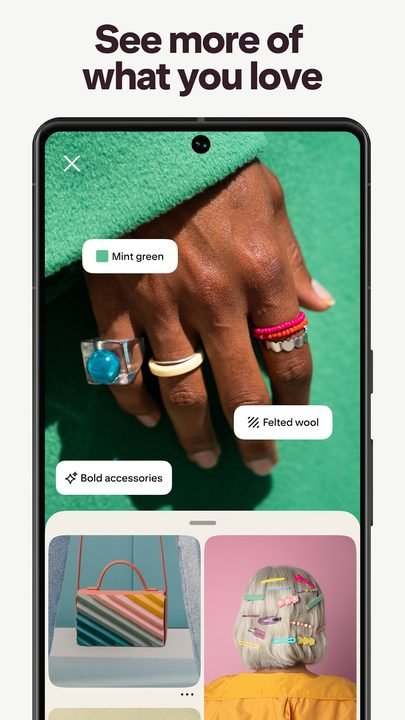
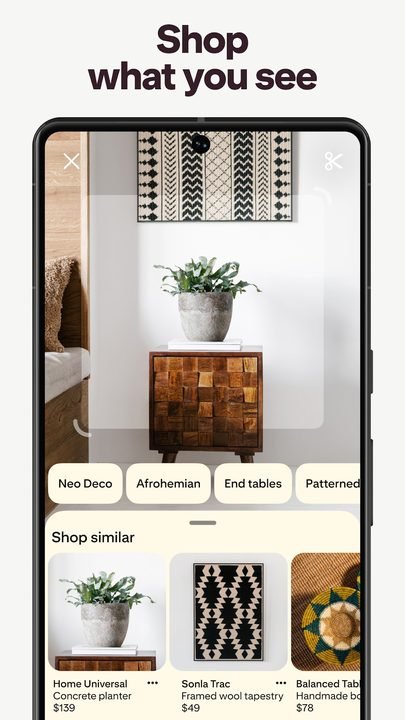
- Use visual search to find products or styles similar to a photo.
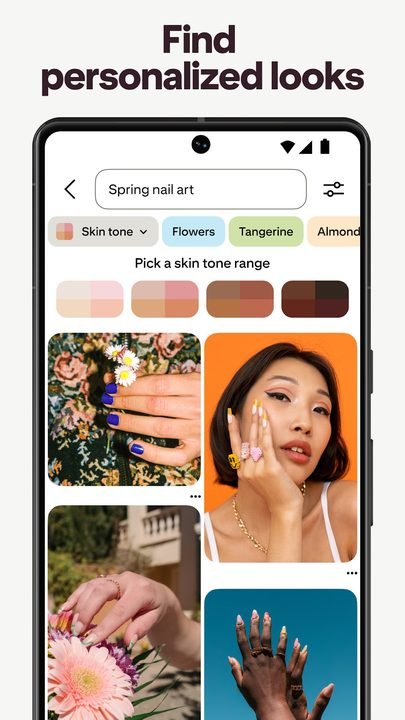
- Get decor, fashion and recipe recommendations tailored to your taste.
- Discover current trends in interior design, beauty, cooking and lifestyle.
🔐 Shopping and community
- Find product pins with direct links to stores so you can buy what you like.
- Follow creators, brands and people with interests similar to yours.
- Share boards with friends or family to plan projects together.
How to download and install Pinterest on Android
- Tap the official download button on this page, which takes you to Google Play.
- Inside Google Play, check that the developer is Pinterest Inc. before installing.
- Tap the “Install” button and wait for the app to download to your device.
- When the installation finishes, open Pinterest from the icon on your home screen.
- Create an account with your email, or sign in with Google if you already have one.
- Select a few topics of interest so the app can personalize your recommendations right from the start.
System requirements
- System: Android compatible with the current version of the app on Google Play.
- Storage: Enough free space for the installation and for the images saved in cache.
- Connection: A stable internet connection, preferably Wi-Fi to load images and videos smoothly.
- Account: A free Pinterest account or Google sign-in to save your boards.
Pros and cons of Pinterest
✓ Advantages
- An endless source of visual ideas for projects of all kinds.
- Simple organization through personalized themed boards.
- Very handy visual search for finding similar styles and products.
- Free app, with no cost to use its main features.
- Ideal for planning decor, fashion, recipes and travel all in one place.
✕ Disadvantages
- It can be absorbing and make you spend more time than you planned.
- It needs a good connection to load high-quality images.
- Some pins lead to external links that aren't very up to date.
- The amount of content can overwhelm someone just starting out.
Pinterest versus its alternatives
Pinterest competes with other visual platforms, though each one has a different focus. While some center on social life and others on professional portfolios, Pinterest stands out for its practical nature geared toward discovering and planning concrete ideas.
| App | Strength | Platform |
|---|---|---|
| Discover, save and organize ideas on boards | Android | |
| Visual social network centered on photos, reels and community | Android / iOS | |
| Behance | Professional creative portfolios and projects | Android / iOS |
Common Pinterest problems and solutions
Images won't load or appear blank
This is usually due to a slow connection. Switch to a stable Wi-Fi network, close and reopen the app, and if it persists, clear the cache from the app's settings.
No recommendations that interest me show up
Interact more with the pins: save the ones you like, and follow relevant boards and topics. The more you use the app, the better your home feed will adjust to your taste.
The app crashes or runs slow
Make sure you have the latest version available on Google Play, free up space on your device and restart your phone. Reinstalling the app can also fix occasional glitches.
I can't sign in to my account
Check your email and password, or use the Google sign-in option. If you forgot your password, use the recovery link from the login screen.
What's new in Pinterest in 2026
Over the course of this year Pinterest has strengthened its personalized recommendations and its visual search, making it easier to find ideas and products similar to an image. The shopping experience has become smoother, with better-integrated product pins and clearer links to stores. Loading times, navigation between boards and the organization of saved content have also been polished, so that planning any project —from a remodel to a wardrobe refresh— is faster and more enjoyable.
Frequently asked questions about Pinterest
Is Pinterest free?
Yes, Pinterest is a free app. You can create an account, save pins, build boards and explore ideas at no cost.
Is it safe to download Pinterest?
Yes, as long as you do it from the official Google Play, as this page links to. That way you make sure you install the authentic version developed by Pinterest Inc., free of third-party modifications.
Does Pinterest work on iPhone?
Yes, in addition to Android, Pinterest is available for iPhone devices through its corresponding app store.
Do I need an account to use Pinterest?
To save pins and create boards you need a free account, which you can open with your email or by signing in with Google.
Conclusion: is Pinterest worth it in 2026?
Pinterest remains one of the best tools for those looking for inspiration who want to go from idea to action. Its combination of visual discovery, organized boards, image search and shopping options makes it an ideal ally for decor, fashion, cooking and travel projects. Being free and downloaded from the official Google Play, it offers a safe and hassle-free experience. If you like to plan, collect ideas and discover trends, Pinterest is totally worth having on your Android in 2026.
Features
Screenshots


How to Download & Install Pinterest
Click the download button above to get the latest APK file.
Go to Settings > Security > Enable "Install from Unknown Sources" or allow your browser to install apps.
Open your file manager and navigate to the Downloads folder to find the APK file.
Tap the APK file and follow the on-screen instructions to complete the installation.
Launch Pinterest from your app drawer and enjoy all its features!
Ready to Download?
Pinterest v12.18.0 · 68.7 MB · Safe & Verified
What's New v12.18.0
v12.18.0: Latest update with performance improvements and new features.
Frequently Asked Questions
Is Pinterest safe?
The button takes you to the official Google Play listing, which scans apps with Google Play Protect. Modilimitado does not host the file. Avoid modified APKs from other sites.
Is Pinterest free?
Yes, Pinterest is free. The button takes you to the official Google Play listing. Modilimitado does not host the file.
Will it work on my device?
Requirement listed on this page: Android 6.0+. Check the store or the official website to see if your model is supported.
Do I need to create an account?
No, you don't need to sign up to download Pinterest.
How do I update to the latest version?
Come back to this page to get the latest version. We update Pinterest regularly.