About PhotoRoom
What is PhotoRoom?
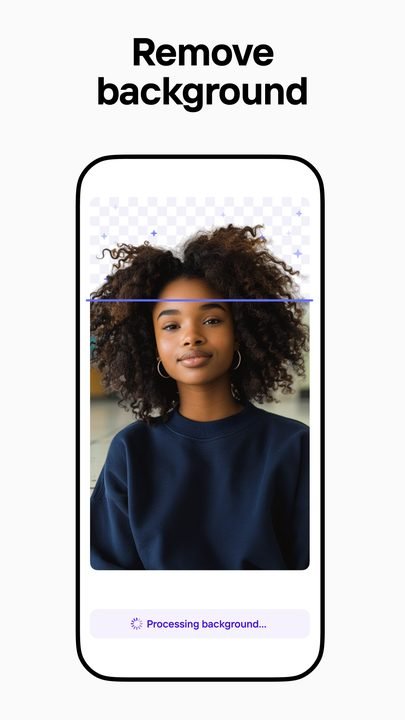
PhotoRoom is an AI-powered photo editor developed by the company Photoroom for Android. Its biggest draw is the ability to remove and replace the background of any image automatically with a single tap, cutting out the subject with precision even in tricky areas like hair or fine edges.
It's designed above all for sellers, small online stores and content creators who need clean, professional images without knowing advanced retouching. With ready-to-use templates, AI-generated backgrounds, batch editing and exports tailored to marketplaces like Amazon, Etsy or Instagram, PhotoRoom turns a photo taken with your phone into a product listing that sells in a matter of seconds.
Key features of PhotoRoom 2026
These are the features that set PhotoRoom apart from a conventional editor:
🔧 Backgrounds and artificial intelligence
- Automatic background removal in one tap.
- AI-generated new backgrounds from a text description.
- Realistic shadows and lighting that matches the scene.
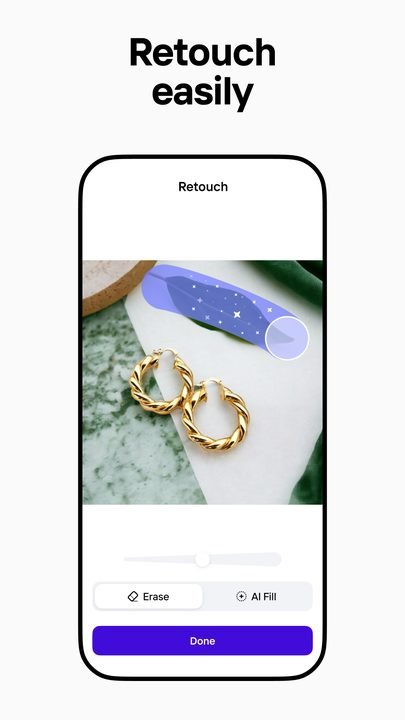
- Removal of unwanted objects with smart fill.
✨ Templates and design
- Hundreds of templates for product, sales and social media.
- Text, logo and brand element tools.
- Automatic resizing for every platform.
🔐 Productivity and export
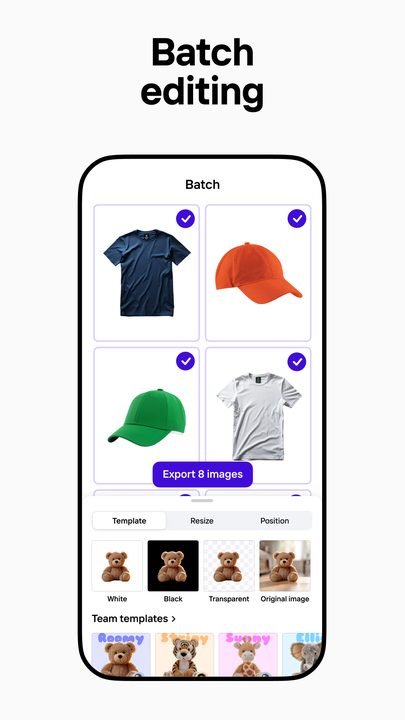
- Batch editing to process many images at once.
- AI-powered retouching and cleanup of imperfections.
- High-resolution export and e-commerce-ready formats.
How to download and install PhotoRoom on Android
- Tap the official download button on this page, which opens the PhotoRoom listing on Google Play.
- Tap Install and wait for the download to finish.
- Open the app from the icon on your home screen.
- Grant access to your photos or camera to start editing.
- Pick an image and let the AI cut out the background automatically.
- Choose a template or background, tweak the design and export; subscribe to Pro if you want every feature.
System requirements
- System: Android 8.0+
- Storage: around 150 MB for the app, plus space for your images and exports.
- Connection: recommended for generative AI features and template downloads; basic cutout can work offline.
- Account: optional to get started, handy for syncing your work and your subscription.
Pros and cons of PhotoRoom
✓ Advantages
- Very accurate and fast automatic background cutout.
- Perfect for product and e-commerce photos without design skills.
- AI-generated backgrounds and professional templates.
- Batch editing that saves a huge amount of time.
- Exports tailored to each marketplace or social network.
✕ Disadvantages
- The best features require the Pro subscription.
- Some free exports may come with limitations.
- Generative AI needs an internet connection.
- Less fine manual control than a classic professional editor.
PhotoRoom versus its alternatives
Compared to Canva, PhotoRoom is far more specialized in background cutout and product photos, whereas Canva is broader for general graphic design. Compared to Adobe Express, PhotoRoom wins on speed for sellers and catalogs, while Adobe Express offers more design tools within the Adobe ecosystem.
| App | Strength | Platform |
|---|---|---|
| PhotoRoom | AI background cutout and product photos | Android / iOS |
| Canva | General graphic design and templates | Android / iOS |
| Adobe Express | Design within the Adobe ecosystem | Android / iOS |
Common PhotoRoom problems and solutions
The cutout leaves imperfect edges
Use the cutout's manual retouch tool to refine edges and hair, and try to start from a photo with good contrast between subject and background.
Some features ask for a subscription
Those features belong to the Pro plan. You can keep using the free tools or subscribe to unlock all the options.
AI-generated backgrounds won't load
Check your internet connection, since generative AI works online. Retry or change the description if the result isn't convincing.
The export loses quality
Make sure you're exporting at the highest resolution available on your plan and review the format settings for your target platform.
What's new in PhotoRoom in 2026
Version 6.8.2 from June 2026 adds new AI-generated backgrounds and noticeably improves the cutout in difficult areas like hair and fine edges. Over the course of the year, batch editing became faster, marketplace-specific templates were added, automatic shadows were improved for greater realism, and the text editor was redesigned to create more attractive product listings.
Frequently asked questions about PhotoRoom
Is PhotoRoom free?
Yes, it's free to download and lets you cut out backgrounds and edit, though the more advanced features and unlimited export require the Pro subscription.
Is it safe to download PhotoRoom?
Yes, as long as you download it from the official Google Play, as this page links to. Avoid modified APKs from external sites.
Does PhotoRoom work on iPhone?
Yes, there's an iOS version on the App Store in addition to the Android one.
Do I need an account to use PhotoRoom?
You can start without an account, but signing in helps you save your work and sync the subscription across devices.
Does PhotoRoom use a lot of data or battery?
The generative AI features use data when connecting to the cloud; basic cutout and editing use very little once the app is installed.
How do I update PhotoRoom?
From Google Play, tap Update on the app's listing or enable automatic updates.
Conclusion: is PhotoRoom worth it in 2026?
If you sell online or need clean, professional product images without any hassle, PhotoRoom is one of the most useful apps you can install in 2026. The free version handles the essentials and the Pro subscription more than pays off for anyone managing catalogs or posting frequently on social media and marketplaces.
Features
Screenshots


How to Download & Install PhotoRoom
Click the download button above to get the latest APK file.
Go to Settings > Security > Enable "Install from Unknown Sources" or allow your browser to install apps.
Open your file manager and navigate to the Downloads folder to find the APK file.
Tap the APK file and follow the on-screen instructions to complete the installation.
Launch PhotoRoom from your app drawer and enjoy all its features!
Ready to Download?
PhotoRoom v6.8.2 · 150 MB · Safe & Verified
What's New v6.8.2
v6.8.2 (Junio 2026): nuevos fondos generativos con IA y mejoras en el recorte de cabello y bordes finos.
v6.7.0 (Abril 2026): edición por lotes más rápida y nuevas plantillas de marketplace.
v6.6.0 (Febrero 2026): sombras automáticas mejoradas y rediseño del editor de texto.
v6.5.1 (Diciembre 2025): correcciones de estabilidad y exportación más rápida.
Frequently Asked Questions
Is PhotoRoom safe?
The button takes you to the official Google Play listing, which scans apps with Google Play Protect. Modilimitado does not host the file. Avoid modified APKs from other sites.
Is PhotoRoom free?
It is free to download, but it has paid features, subscriptions or in-app purchases. The button takes you to the official Google Play listing. Modilimitado does not host the file.
Will it work on my device?
Requirement listed on this page: Android 8.0+. Check the store or the official website to see if your model is supported.
Do I need to create an account?
No, you don't need to sign up to download PhotoRoom.
How do I update to the latest version?
Come back to this page to get the latest version. We update PhotoRoom regularly.