About Amazon Prime Video
What is Amazon Prime Video?
Amazon Prime Video is Amazon's streaming service, developed by Amazon Mobile LLC, bringing together series, movies and original productions on demand. The app lets you watch it all from your Android phone or tablet and is part of the Amazon Prime subscription, though it can also be signed up for on its own for anyone who only wants the video.
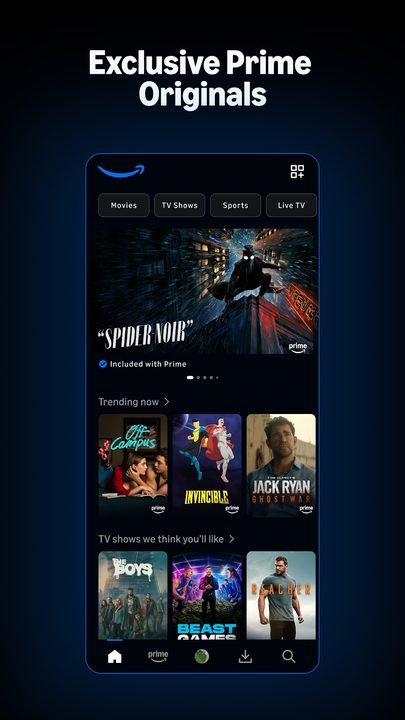
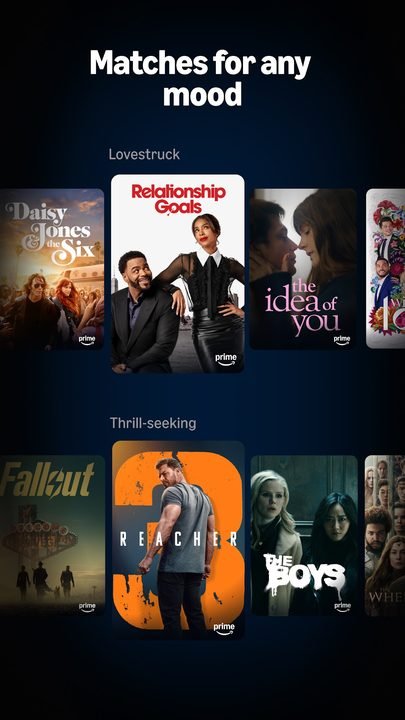
Its catalog stands out for the Amazon Originals, big-budget exclusive titles, and for extras like the X-Ray feature, which shows information about the actors and the soundtrack as each scene plays. Beyond the included content, it offers movie rentals and purchases, add-on subscription channels and, in some regions, live sports events, making it a highly versatile platform.
Key features of Amazon Prime Video 2026
These features sum up what the Prime Video app offers in its current version.
🔧 Playback
- HD and 4K HDR streaming depending on the device and the plan.
- Downloads to watch titles offline.
- Progress syncing across phone, TV and browser.
✨ Content and extras
- Exclusive Amazon Originals and frequent new releases.
- X-Ray feature with actor details and soundtracks.
- Rentals, purchases and add-on channels within the app.
🔐 Family control
- Kids profiles with filtered content.
- PIN-based parental controls.
- Management of devices linked to the account.
How to download and install Amazon Prime Video on Android
- Tap the official download button on this page, which opens Google Play.
- On the Prime Video listing, tap “Install” and wait for it to finish.
- Open the app from its icon on the home screen.
- Sign in with your Amazon account that has Prime or Prime Video.
- Select or create your profile and browse the available catalog.
- To watch offline, download the compatible titles from their listing.
System requirements
- System: Android 7.0 or higher.
- Space: around 45 MB for the app, plus space for downloads.
- Connection: stable internet; 4K content requires a good speed.
- Account: an Amazon account with Prime or a Prime Video subscription.
Pros and cons of Amazon Prime Video
✓ Advantages
- Included at no extra cost with Amazon Prime.
- Quality exclusive Amazon Originals.
- X-Ray feature unique in the sector.
- Downloads to watch offline.
- Lets you rent or buy individual titles.
✕ Disadvantages
- The interface mixes included content with paid content.
- The catalog varies by country.
- Some channels require additional subscriptions.
- There are ads unless you pay for the ad-free option.
Amazon Prime Video versus its alternatives
Prime Video competes with Netflix, Disney+ and Max. Its big advantage is coming included with Amazon Prime, which adds fast shipping and other services. Netflix offers a cleaner interface and more global originals, while Disney+ concentrates the major family brands. Prime Video, on the other hand, adds extras like X-Ray and the purchase of individual movies.
| App | Strong point | Platform |
|---|---|---|
| Amazon Prime Video | Included with Prime and X-Ray | Android |
| Netflix | More originals and a better interface | Android / iOS |
| Disney+ | Disney, Marvel and Star Wars brands | Android / iOS |
Common Amazon Prime Video problems and solutions
A title shows as not included with Prime
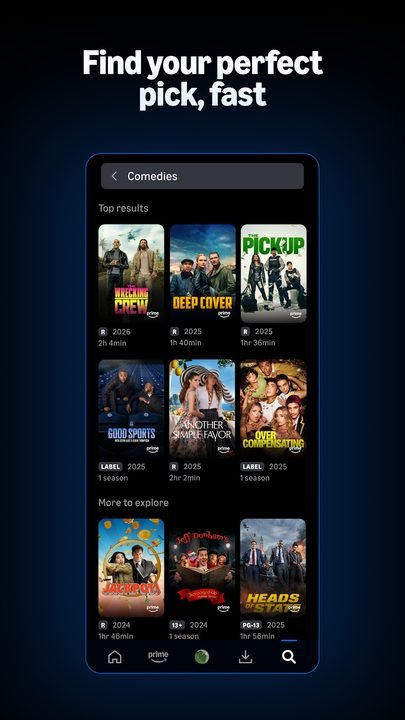
Not the entire catalog is part of the subscription. Filter by “Included with Prime” in the search menu to see only the free content and avoid rentals or purchases.
The video keeps buffering
Connect to a stable Wi-Fi network and close other apps. If it still fails, lower the playback quality in the app's streaming settings.
I can't sign in
Use the same Amazon account you signed up for Prime with. If you forgot the password, recover it from the Amazon website and try again.
My downloads disappeared
Downloads expire after a period or if you exceed the title limit. Open the app with internet to renew the license or download the content again.
What's new in Amazon Prime Video in 2026
Version 3.0.405 from June 2026 speeds up catalog loading and fixes errors in the X-Ray feature. Over the course of the year the app has rolled out a new downloads interface, expanded 5.1 audio support, redesigned the home screen with smoother carousels and improved kids profiles, in addition to optimizing battery usage on mid-range phones.
Frequently asked questions about Amazon Prime Video
Is Amazon Prime Video free?
The app is free to download, but the content requires an Amazon Prime subscription or a separate Prime Video one. Some titles are rented or purchased separately.
Is it safe to download Amazon Prime Video?
Yes, as long as you do it from the official Google Play, as this page links to. It's the verified Amazon app.
Does Amazon Prime Video work on iPhone?
Yes, there's an iOS version, plus apps for smart TV, consoles and browser, all with the same Amazon account.
Do I need an account to use Amazon Prime Video?
Yes, you must sign in with an Amazon account that has Prime or Prime Video active in order to play the catalog.
Does Amazon Prime Video use a lot of data or battery?
High-quality streaming eats up quite a bit of data. You can adjust the quality and download over Wi-Fi to watch later without using mobile data.
How do I update Amazon Prime Video?
Open Google Play, search for Prime Video and tap “Update”. With automatic updates it will stay current without you doing anything.
Conclusion: is Amazon Prime Video worth it in 2026?
Amazon Prime Video is a highly recommendable option in 2026, especially if you already have Amazon Prime, because the video comes included at no additional cost. Its originals, the X-Ray feature and the downloads make it competitive against Netflix and Disney+. The mix of included content with rentals can be confusing at first, but by filtering for the free content you get the most out of one of the most complete platforms on the market.
Features
Screenshots
How to Download & Install Amazon Prime Video
Click the download button above to get the latest APK file.
Go to Settings > Security > Enable "Install from Unknown Sources" or allow your browser to install apps.
Open your file manager and navigate to the Downloads folder to find the APK file.
Tap the APK file and follow the on-screen instructions to complete the installation.
Launch Amazon Prime Video from your app drawer and enjoy all its features!
Ready to Download?
Amazon Prime Video v3.0.405 · 45 MB · Safe & Verified
What's New v3.0.405
v3.0.405 (Junio 2026): Mejoras en la velocidad de carga del catálogo y correcciones en la función X-Ray.
v3.0.398 (Abril 2026): Nueva interfaz de descargas, soporte ampliado para audio en 5.1 y arreglo de errores de inicio de sesión.
v3.0.390 (Febrero 2026): Rediseño de la pantalla de inicio con carruseles más fluidos y mejoras en los perfiles infantiles.
v3.0.382 (Diciembre 2025): Optimización del consumo de batería y mejoras de estabilidad en dispositivos de gama media.
Frequently Asked Questions
Is Amazon Prime Video safe?
The button takes you to the official Google Play listing, which scans apps with Google Play Protect. Modilimitado does not host the file. Avoid modified APKs from other sites.
Is Amazon Prime Video free?
Yes, Amazon Prime Video is free. The button takes you to the official Google Play listing. Modilimitado does not host the file.
Will it work on my device?
Requirement listed on this page: Android 7.0+. Check the store or the official website to see if your model is supported.
Do I need to create an account?
No, you don't need to sign up to download Amazon Prime Video.
How do I update to the latest version?
Come back to this page to get the latest version. We update Amazon Prime Video regularly.